Oops! Something went wrong while submitting the form.

Release notes
Release notes
November 25, 2025
November Product Update
AI
This November, we’re introducing several new updates that make Lumana easier to tailor to your environment and faster to use during investigations. This release adds Custom Object Search & Alerts, new ways to organize and view your cameras, direct alert delivery to Microsoft Teams and FLIR, quicker navigation from alerts to full camera details, and 24/7 customer support so you can reach Lumana whenever you need help.
AI
Custom Object Search & Alerts — Train Lumana to recognize objects unique to your environment, such as fleet vans, emergency vehicles, or distinct uniforms, making detections more accurate, relevant, and actionable.
Support
24/7 Customer Support — Reach Lumana support at any time by email or in-app ticket when you need help with issues, configuration, or active incidents.
Lumana Status Page — View live system status, uptime over the past 90 days, and any reported past incidents.
VMS+
Custom Wall — Build flexible monitoring walls by dragging, resizing, and arranging camera and alert tiles so operators always see the most critical views first.
Device Page Reorder — Drag and drop locations and cameras into an order that matches your preferred layout, helping teams find the right view faster during investigations.
Shortcut to Camera Page — Jump directly from an alert to the camera’s full page, eliminating extra clicks when you need live video, playback, and status in one place.
Microsoft Teams Integration — Deliver Lumana alerts and notifications directly into Teams channels so users see and respond to events in the tools they already use.
FLIR Integration — Send Lumana alerts into your existing FLIR VMS so operators can act on AI detections without leaving their familiar interface.
Optimization
Enterprise Authentication — SAML and SCIM with Microsoft Entra ID are now available, allowing users to sign in with their existing identities and enabling IT to centrally manage and automate access.
View more
View less
Release notes
Release notes
October 29, 2025
October Product Update
AI
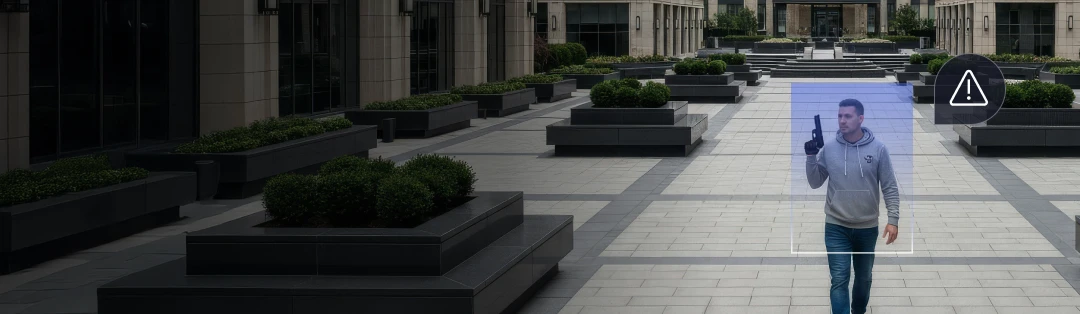
This October, we’re introducing Gun Brandished detection, an AI upgrade that recognizes the behavior of a gun being drawn or pointed, not just a static object. By distinguishing “gun brandished” from “gun detected,” you get fewer false alarms, clearer context of actual threats, and faster, more confident response.
AI
Gun brandished — Detects when a gun is actively drawn or pointed, with multi-layer AI verification to cut false alarms and optional alarm monitoring for live human alert verification and automatic emergency dispatch.
View more
View less
Release notes
Release notes
September 30, 2025
September Product Update
VMS+
This September, we’re introducing several updates across the Lumana platform that make investigations faster and streamline day-to-day workflows. This release includes a new dedicated Access Control page with video-linked events, an updated Devices page for unified device management, time zone-aware search for multi-region teams, and low-latency local live video on web and mobile. Let’s explore what’s new.
VMS+
New Access Control Page — Added a dedicated page for reviewing access control events. Filter by time, user, site, device, or event type, view linked video clips, add comments for context, and share events with your team.
Updated Devices Page — A redesigned view consolidates all devices (cameras, doors, cores, speakers, and more) into a single dashboard with device health status and intuitive filters.
Search with Time Zone Selection — Users can select the time zone to apply when conducting an investigation, making it easier to work across multiple regions.
Optimization
Low-Latency Local Live View — See live video with near-zero delay on web and mobile.
View more
View less
Release notes
Release notes
August 27, 2025
August Product Update
VMS+
Following the largest Series A round in physical security, we’re moving fast to deliver innovations that make video intelligence more powerful and proactive than ever. This release introduces advanced text-based search across video, alarm monitoring with human verification and emergency dispatch, and a suite of enhancements that improve visibility, control, and efficiency across your operations. Let’s dive in.
VMS+
Dark Mode — The web app now supports dark mode for a modern, comfortable viewing experience.
Fisheye Dewarping — Fisheye dewarping is here. Easily view live dewarped video with digital PTZ capabilities or tile view for greater situational awareness.
Time-lapse — Generate time-lapse videos from any camera for faster reviews and visual summaries.
Audio Recording — Audio is now supported across both live view and playback. Recording can be enabled/disabled at the organization or camera level.
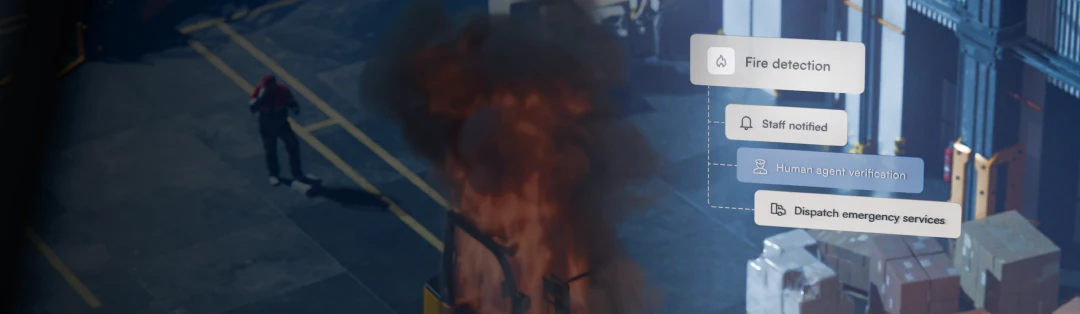
Alarm Monitoring — Alerts can be sent to our monitoring center for real-time incident verification and automatic emergency dispatch.
Low Bandwidth Mode - To further improve bandwidth efficiency, users can now set the substream for analytics and use the main stream only when HQ streaming is requested.
AI
Free Text Search — Search video with natural language queries.
Smoke Detection — Fire alerts now include smoke detection for more proactive alerting and response.
Training Control — Users can now fine-tune AI training. Options include deleting custom models, limiting updates, or stopping model training once performance is satisfactory.
Mobile
New Single Camera Screen — A refreshed single-camera view now includes live view, playback, and info tabs in one streamlined layout.
View more
View less
Release notes
Release notes
June 30, 2025
June Product Update
VMS+
We’re excited to introduce powerful updates across the Lumana platform that give you deeper visibility, greater flexibility, and faster control over your video security system. From full-day archiving to expanded language support, discover what’s new in our latest product update.
VMS+
24-Hour Archives — Significantly surpassing our previous 10-minute archive limit, you can now upload and store up to 24 hours of continuous video and archive directly to the cloud. This feature enables users to archive long-form footage for incidents, compliance purposes, or future investigations.
Archive Playback Controls — Users can now easily review archive footage with variable playback speed (up to 10x) to make viewing historical footage more efficient than ever.
Enhanced Reports with Alert and Container Details — Reports now include entries for Alert and Container activity, including key details and exact timestamps in .csv format.
Localization Support (Beta) — Localization options let you change your platform language from English to Hebrew or Spanish.
Automated Alert Group Changes — Administrators can now choose to arm or disarm alert groups as part of an alert action.
Receive Alerts While Offline — By utilizing Webhooks, Lumana can now trigger alerts and include images even if the system is temporarily offline to ensure no events go unnoticed.
Mobile
Multi-Camera Historical Playback — Users can now select multiple cameras to view synchronized historical playback on mobile, making it easier to investigate multiple cameras while on the go.
Full Archive Support — Create, review, and share full video archives directly from the mobile app.
AI
Animal Detection Model Update — Lumana now supports the detection of mules, cows, and sheep to better serve agriculture and outdoor environments.
View more
View less
Release notes
Release notes
May 22, 2025
May Product Update
AI
May brings another round of powerful updates across Lumana’s AI, VMS+, and mobile app. This month, we’re introducing a suspect alert system, faster playback, bulk camera updates, and a major refresh of the mobile app. Let’s dive in.
AI
Suspect Alerts — Expanding on our facial recognition capabilities, suspect alerts increase the rate of comparison for people within a scene. When Lumana detects a person with high similarities to someone on your suspect list, even if it’s not an exact match, the system will trigger an alert. This higher-sensitivity mode is ideal for catching lookalikes or people trying to disguise themselves.
VMS+
Faster Camera Playback — Review footage faster with support for playback speeds up to 10x.
Additional Camera Investigation Options — Get more context at a glance. Users can now select alerts and door access events in the thumbnail dropdown under camera metadata.
Bulk Camera Configuration — Save time and simplify deployment by configuring multiple cameras simultaneously with our new bulk update tool.
Mobile
New Side Menu — Users can now use the side menu for faster navigation to the Camera, Search, Alerts, and Wall pages.
Search and Filter Cameras — Users can quickly find and filter cameras by typing device name, selecting location, or status.
Grid View — Easily view all cameras in a grid view, exactly like the Lumana web app.
Additional Camera Thumbnail Options — View alerts and door access Events directly on the camera page.
Object and Clip Toggle — Users can tailor how to view Search and Alert results by adjusting the object and clip toggle at the top of their respective pages.
View more
View less
1 / 3
Have a question?
Fill out the form below for additional support.
Thank you, you are in!
Oops! Something went wrong while submitting the form.
Submissions will be used in accordance with our Privacy Policy.